Checkbot: Integration from your structural software to PROFIS Engineering
How are you today bringing the information from your structural software to PROFIS Engineering? If the answer is “manually”, we have a better solution for you!

Checkbot: Integration from your structural software to PROFIS Engineering
How are you today bringing the information from your structural software to PROFIS Engineering? If the answer is “manually”, we have a better solution for you!
Checkbot is your solution
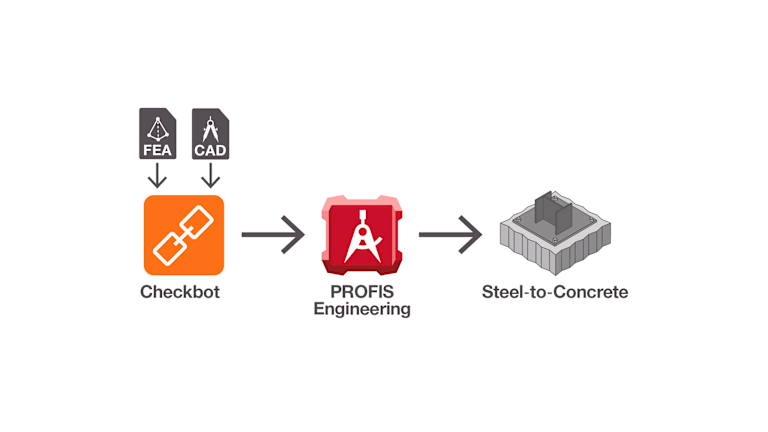
We have partnered with IDEA StatiCa to develop a simple and reliable integration: Checkbot. It acts as a bridge between your structural software and PROFIS Engineering, allowing you to transfer your connection data in just a few clicks. As a PROFIS Premium user, you get full access to all IDEA StatiCa Checkbot capabilities – included in your license.
Start today
Saving time
Increasing effectiveness
Reducing copying errors
What information gets transferred to PROFIS?
You will be able to automatically import the following structural data:
Load combinations (*)
Profile geometry and material properties
Design code preference
And if you make changes in the Checkbot model, you can simply Export again, and updates will be made in PROFIS – with just one click on Checkbot (“Export”) and one click in PROFIS Engineering (“Confirm”).
(*) With functions like “Evaluate critical effects” of load combinations, IDEA StatiCa’s Checkbot simplifies complex scenarios by reducing hundreds of load cases into manageable sets and automatically evaluating the critical load cases. This functionality is fully available in PROFIS Engineering through Checkbot integration.
On this first version, this data is imported for single steel profile connections, one connection at a time. We keep developing this feature to take these capabilities further.
How can I get started?
Find below a comprehensive step-by-step guide, which will be easier if you already are an IDEA StatiCa and PROFIS user, and if your BIM links are automatically integrated:
Create an account for free: Role navigation | IDEA StatiCa
Download IDEA StatiCa software: Downloads | IDEA StatiCa
Check BIM-link compatibility: IDEA Statica BIM links | IDEA StatiCa
Export from your Checkbot model to PROFIS Engineering!
Integration workflows
You can check the updated list of supported structural software here: IDEA Statica BIM links | IDEA StatiCa.
The structural software are split in the following categories of integration with Checkbot:
Fully automated Integration: With BIM link, this automatically installs the plug-in to your structural software, allowing users to export connection data with one click. If the structural software is not installed in your computer, it will indicate “Target application not found”. Examples: Robot, RFEM 5 and 6, RSTAB 8 and 9, SCIA Engineer, STAAD.PRO 2024, Advanced Design, Axis VM, Midas Civil NX, RAM, etc.
Automated External Integration: Checkbot is installed separately and runs as an external application. It connects to the structural software but is not embedded in its interface. Examples: SAP2000, ETABS, Midas Civil and Gen, etc. How to easily integrate ETABS with IDEA StatiCa | IDEA StatiCa
File-Based Integration through SAF- or IOM-files: Data is exported from the structural software as a file and then imported into Checkbot manually. No live connection or plugin is used. Examples: Sofistik, RISA, etc. Note that older versions of these softwares might not be supported by IDEA StatiCa integration.
Final step: Export to PROFIS! On the “HILTI PROFIS” tab, click on “Export”. It will automatically open PROFIS and ask you to “Confirm” the import. After you can get your steel-to-concrete connection design started in PROFIS Engineering!
In case of further questions, get in contact with us through the “Support” tab in PROFIS Engineering or your local Hilti engineering contacts.